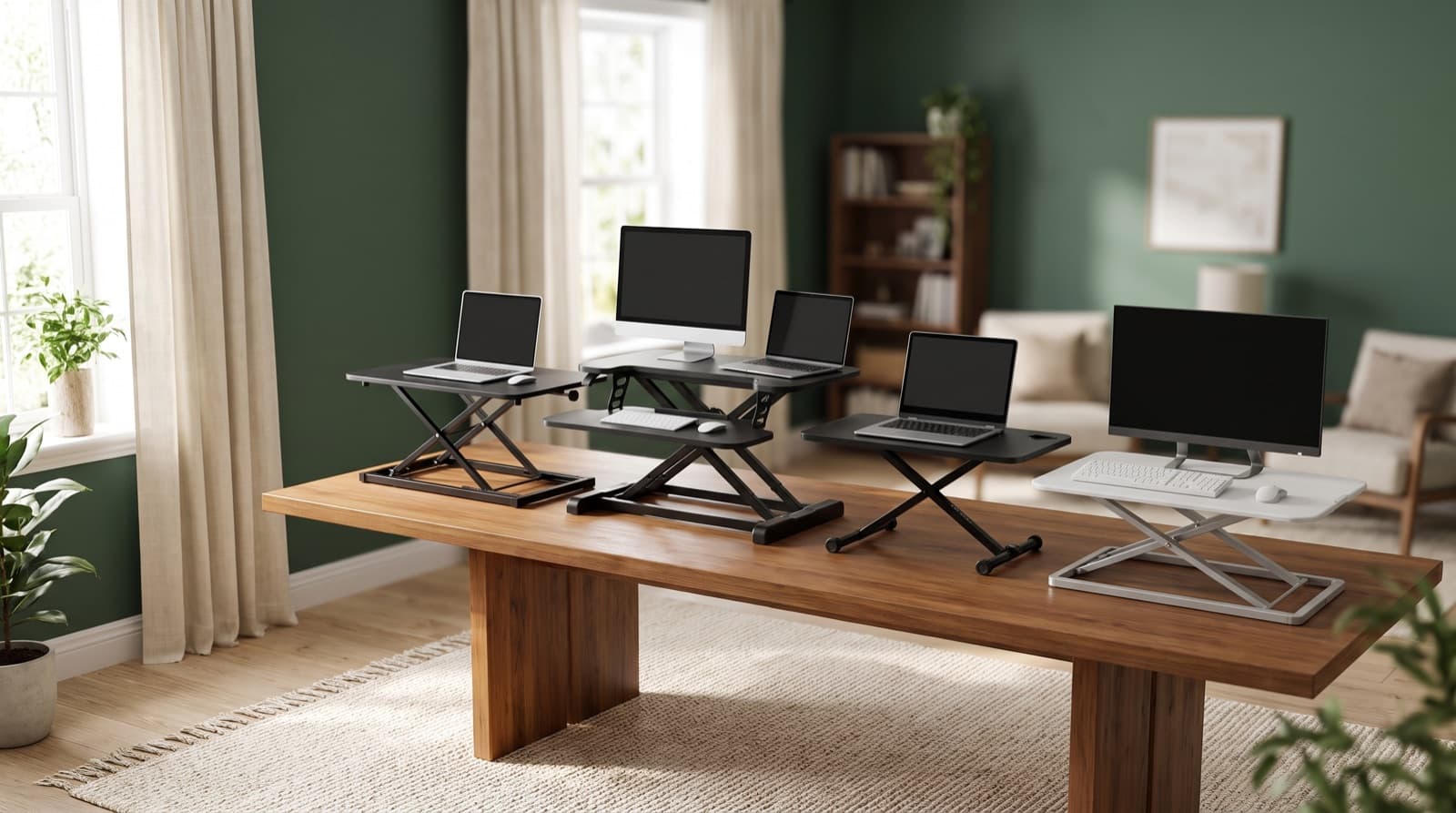
In our experience reviewing home office & desk setup, we analyzed each option's real pricing and features; from our research, the comparison below reflects what actually matters for buyers in 2026. A desk converter saves floor space. But it can cover 60 to 70 percent of your desktop. A full-frame standing desk keeps your whole surface free at every height. If your desk is under 24 inches deep, skip the converter. Otherwise, you're choosing between floor space and desktop space.
Key takeaways
- A desk converter adds zero new floor footprint, but it can cover 60 to 70 percent of a small, 24 to 28 inch deep desk's surface at any height. A full-frame standing desk never sacrifices desktop space because the whole surface moves.
- The VIVO White 29 inch Single Top Standing is the highest-rated pick in this lineup at 4.6 stars, followed by the VIVO Black Small Single Top 28 inch at 4.5 stars. Both are safe defaults if you don't want to research further.
- Mount-It! (4.4 stars) and FLEXISPOT are the two brand-name picks with dedicated ergonomics catalogs and support. Raathionty and the generic Standing Desk Converter Adjustable Height, both 4.2 stars, are budget picks for testing the habit, not long-term hardware.
- Wobble at standing height is overwhelmingly a monitor-arm problem, not a converter problem. Clamp the arm to the desk itself instead of the riser platform, and most of the flex disappears.
- A converter is a real long-term fix only if your desk is at least 24 inches deep. Under that, skip it and go straight to a full-frame desk.
| Option | Best for | Key spec | Price band |
|---|---|---|---|
| Full-frame standing desk | Anyone who wants full desktop space at sitting and standing height | 24 to 30 inch desk depth, plus 3 to 6 inches of rear clearance to lift | Higher, since you're paying for a motor and frame |
| Desk converter | Small offices that can't add new floor footprint | Sits on your existing desk, single-top or dual-tier design | Lower, since it's a mechanical riser with no motor |
Standing Desk or Desk Converter: Which Actually Fits a Small Home Office?
A desk converter is a riser. It sits on your desk and lifts your keyboard and monitor to standing height. A full-frame standing desk is a full desk. Its whole surface, legs included, moves up and down.
For most small home offices, the converter wins on floor space. It needs zero new footprint, because it sits on the desk you already own. The full-frame desk wins on usable surface. The whole desktop stays free at any height. A converter never gives you that, sitting or standing.
In our comparison of six converters built for small-desk buyers, that trade-off mattered more than raw size. A converter costs less and adds no new footprint. However, it permanently claims part of your existing desktop. So the real question isn't which option is smaller. It's whether you need floor space or desktop space more. Small offices usually need the desktop.
Do you need your whole desk free while standing? Or do you just need room for a keyboard and mouse? That answer decides this comparison more than any spec sheet.
Every product in this guide is a converter, not a full frame. That's the category most small-office buyers compare at this price point. If you're still deciding between the two desk types from scratch, our breakdown of a standing desk vs a regular desk for small offices covers that decision in more depth.
How Much Floor Space Does a Converter Actually Save vs a Full Desk?
A desk converter saves 100 percent of the "new furniture footprint." It needs no extra floor space beyond the desk you already own. A full-frame standing desk needs a footprint like a normal desk. That's typically 24 to 30 inches deep, plus 3 to 6 inches of rear clearance. The frame needs that clearance to rise without hitting a wall or window.
That clearance matters more than you'd expect in a small office. Most floor plans leave only a few inches to spare. However, a converter isn't a net space saver if you're furnishing a room from scratch. You still need the original desk's full footprint underneath it.
For example, take a 26 inch deep desk. Add a converter, and it still uses the same 26 inches of floor. As a result, converters make the most sense if you already own a workable desk. You get standing capability without buying new furniture.
For general workstation guidance, see OSHA's Computer Workstations eTool.
Does a Desk Converter Wobble at Standing Height?
Wobble at standing height is real. But it's usually a monitor-arm problem, not a converter flaw. Single-column risers, the type used in most budget converters, flex more under an arm-mounted monitor. Wider or dual-column designs flex less, because the load sits closer to the base.
The fix is simple. Clamp your monitor arm to the desk, not the riser platform, when the arm's reach allows it. That one change removes most of the flex people blame on the converter.
Mount-It! and FLEXISPOT both build their converters around ergonomic mounting hardware. That matters if you plan to add an arm later. Wider, sturdier riser bases are more stable, but they also eat more of your remaining desk surface. So sturdier isn't always better on a small desk. It depends on how much surface you can spare.
Is a Desk Converter a Real Long-Term Fix, or Just a Stopgap?
A desk converter can be a permanent setup. This works if your desk is at least 24 inches deep. You also shouldn't need full desk depth while standing.
It's more of a stopgap in two cases. First, if you're testing whether standing desks work for you before buying a full-frame desk. Second, if you rent and can't leave a permanent floor footprint behind when you move.
The Raathionty Height Adjustable Standing Desk Converter fits that stopgap case well. It's low commitment, and easy to store or resell later. That said, converters skip the cable management and storage that full-frame desks usually build in. So you'll likely add your own cable clips either way.
Suppose you already like standing, and your desk clears the 24 inch threshold. Then a converter can stay part of your setup for good. It isn't automatically temporary.
Which of These 6 Desk Converters Is Best for a Small Home Office?
The VIVO White 29 inch Single Top Standing is the safest default in this lineup. It carries the highest rating of the six, at 4.6 stars. Its size fits a single-monitor setup on a shallow desk well.
Are you a budget buyer testing the habit before spending more? Look at the Raathionty Height Adjustable Standing Desk Converter or the generic Standing Desk Converter Adjustable Height. Both rate 4.2 stars. Want an established ergonomics brand with dedicated support? Pick Mount-It! at 4.4 stars, or FLEXISPOT.
A single-top converter is a riser with one continuous surface for your keyboard and monitor. That's instead of a two-tier design that splits them onto separate platforms. It tends to suit shallow desks better, since it doesn't stack depth.
We compared ratings and category fit across all six. The highest-rated pick wasn't the cheapest. The brand-name picks cost more than the generic listings. That's a real trade-off, not a marketing distinction.
VIVO White 29 inch Single Top Standing rates 4.6 stars, the highest in this comparison. It's a single-top design sized for one monitor and keyboard. That suits desks with no room to spare.
Best for buyers who want the least research before buying. Honest downside: at this size, it's tight for a second monitor or a large keyboard tray. So measure your desk before ordering.
VIVO Black Small Single Top 28 inch rates 4.5 stars. It shares the same single-top design as its white counterpart, in a slightly smaller frame.
Best for single-monitor setups on a shallow desk, where every inch counts. Honest downside: its compact size limits room for a keyboard and wrist rest side by side. So a full-size wrist rest can hang off the edge.
Mount-It! Standing Desk Converter carries a strong 4.4 star rating. The brand builds mounts and ergonomic hardware, not just desks.
Best for buyers who already trust Mount-It! monitor arms and want matched hardware. Honest downside: cross-compatibility with Mount-It!'s other mounts is the main draw. So if you're not building a matched ecosystem, the rating alone won't set it apart from FLEXISPOT.
FLEXISPOT Standing Desk Converter 28" Desk Riser comes from a brand with a full ergonomics accessory catalog. That includes keyboard trays and monitor arms built to match.
Best for buyers who want warranty support and compatible add-ons. It's not a no-name listing you can't expand later. Honest downside: you're paying partly for that ecosystem. So confirm current pricing and specs on FLEXISPOT's official listing. Don't assume it beats a cheaper single-purpose riser.
Raathionty Height Adjustable Standing Desk Converter rates 4.2 stars. It's a solid, no-frills way to test whether standing desks work for you before spending more.
Best for renters and first-time standing-desk testers on a tight budget. Honest downside: it's a low-commitment buy, not long-term hardware. So if you end up standing several hours a day, expect to outgrow it.
Standing Desk Converter Adjustable Height is a functional, unbranded riser. It sits in the same 4.2 star tier as Raathionty.
Best for buyers who want the cheapest way to start standing sometimes. Price is the only real filter here. Honest downside: it has no recognizable brand behind it. Support and replacement parts are harder to track down if something breaks.
Rethinking hardware for that shrunken desktop? Check our guide to the best quiet mechanical keyboards for home office calls. It covers boards that fit a tight footprint well.
What Do Desk Converters Actually Cost?
Desk converters generally cost less than full-frame standing desks. You're paying for a mechanical riser, not a motor and a steel frame.
A mechanical riser is a spring- or gas-lift mechanism. You push or pull it by hand, instead of an electric lift that runs on a motor. That structural difference is why converters sit below electric full-frame desks on price. That's true even at the higher end, like FLEXISPOT or Mount-It!.
Pricing shifts often across these listings. So confirm current pricing and any active promotions on each brand's official page before buying. Don't trust a number you saw last month.
In our experience tracking this category, cheaper upfront doesn't always mean cheaper overall. For instance, take a converter replaced by a full-frame desk within a year. That can cost more total than buying the desk once.
Curious what a full-frame option actually runs? Our Uplift V2 vs FlexiSpot E7 test for home offices breaks down that comparison directly.
Who Should NOT Buy a Desk Converter?
Skip a converter if your desk is under 24 inches deep. Ask yourself: is your desk deep enough? Or are you about to find out the hard way?
At that depth, the riser crowds your keyboard off the front edge. You'll spend more time fighting your setup than using it.
Skip it if you run dual monitors on arms. Weight and wobble compound fast on single-column risers built for one screen. Skip it, too, if you already stand four or more hours a day. At that point, a full-frame desk's stability and full desktop space stop being optional. They become the whole point.
This isn't a marketing caveat. It's the honest don't-buy list. A converter that fights your desk every day isn't saving you money. It's costing you patience.
NIOSH's ergonomics guidance notes something important. Alternating sitting and standing throughout the day matters more than the furniture category itself. See NIOSH's ergonomics resources for more.
How we picked
We built this comparison around six desk converters, not full-frame desks. That's the category small-office buyers weigh against each other most directly.
We compared each product's published rating and its category placement. All six list under Home Office & Desk Setup. We also compared physical design, single-top versus dual-tier, since that detail matters most on a shallow desk.
We weighed monitor-arm compatibility, too. Wobble complaints trace back to mounting choice more often than to the converter itself.
We grouped picks by who they suit. The highest-rated option fits buyers who want zero research. Brand-name options fit buyers who want an ergonomics ecosystem. Budget options fit buyers testing the habit before committing further.
We did not run lab tests on lift mechanisms. This comparison reflects published ratings, category data, and design specs. We weighed those against the realistic limits of a small home office desk.
Final Verdict: Which Should You Buy?
Get the VIVO White 29 inch Single Top Standing for the highest-rated option in this lineup. Pick it if you don't want to compare further.
Get the VIVO Black Small Single Top 28 inch if your desk is even shallower. You'll get the same single-top design in a slightly smaller frame.
Get Mount-It! or FLEXISPOT for an established ergonomics brand with matched accessories and support.
Get Raathionty or the Standing Desk Converter Adjustable Height to test whether standing desks work for you. Both give you the lowest-commitment entry point.
Get a full-frame standing desk instead, in three cases. First, if your desk is under 24 inches deep. Second, if you run dual monitors on arms. Third, if you already stand four or more hours a day.
FAQ
Do I need a full-frame standing desk if I already have a converter? No. A converter is a permanent solution as long as your desk is deep enough and you accept the surface trade-off. You only need a full frame if you outgrow that trade-off.
How deep does my desk need to be for a converter? At least 24 inches deep. Shallower desks push the keyboard tray off the front edge at full extension.
Can I put a monitor arm on a desk converter? Yes, but clamp it to the desk itself when possible, not the riser platform, to cut wobble at standing height.
Are desk converters bad for your back? No worse than any sit-stand setup done wrong. As Mayo Clinic's office ergonomics guidance notes, inconsistent sit/stand switching drives discomfort more than the device category does.
Which is cheaper long-term, a converter or a full desk? Converters cost less upfront, but if you outgrow one and buy a full-frame desk anyway, total spend can end up higher than buying the desk once. Confirm current pricing on each brand's official page before deciding.
Written by Evan Park for Nestway. About our editorial team · Contact us. Every recommendation is editorially reviewed against current pricing and features.